Build a history you can answer questions with
Useful service records do more than show that you spent money on the car. They help you answer what was done, when it happened, which vehicle received the work, and what you still need to follow up on without reconstructing the story from memory.
You can keep that history on paper, in a spreadsheet, or in an app. The best format is the one you can update after a visit and retrieve while talking with a technician, rather than a complicated system you stop using after the first month.
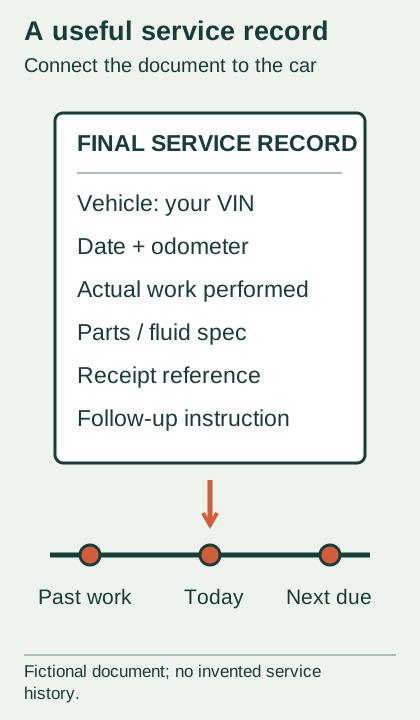
Start with a simple goal: every completed service should connect a short timeline entry to its supporting document. That link is what turns a folder of receipts into a history you and a shop can actually use.
Give each vehicle a clear home
Create one folder for each car and label it with the year, make, model, and an identifier you can distinguish at a glance. Keep the full VIN in the private record if it helps match paperwork, but don't put personal documents into a public sharing folder by default.
Separate cars even when they use similar parts or go to the same shop. An oil receipt in the wrong folder can look convincing until you notice that the mileage, engine, or vehicle identification belongs to something else you own.
Choose a short naming pattern for files, such as date, mileage, and job description, then use it consistently. You don't need specialized software to search for “cabin filter” if those words are already in the filename and the timeline entry.
.jpg)
Record what happened in plain, specific language
For your own timeline, use fields for date, odometer, work performed, parts or fluid identity, shop or person doing the work, and the supporting filename. These are an editorial organization method, not a universal legal form or a substitute for the actual invoice.
Write “engine air filter inspected, no replacement recorded” if that is what the document says. “Filter done” loses both the identity of the filter and the difference between an inspection and a replacement, leaving you with an avoidable question at the next visit.
Keep a short space for a result or follow-up, but don't invent one. A replacement invoice establishes that work was billed or documented; if you want to record whether the original symptom returned, add your dated observation separately.
For an original sample entry, use fictional labels rather than fake prices: “Sample Car A, sample date, sample odometer, cabin filter replaced, invoice filename attached.” Practicing the structure this way helps you spot missing fields before you reorganize years of real paperwork.
Keep estimates, approvals, and final work distinct
An estimate describes proposed work, so don't log it as completed maintenance. Keep it with any approval and the final invoice, then make your timeline entry from the final record and note any difference that still needs clarification.
If the shop recommends something you decline, record it as a recommendation with its date and stated reason. That lets you revisit it deliberately without turning an unapproved suggestion into a repair that your history says already happened.
You can give the same visit a single folder with several files inside. An intake description, estimate, approval message, final invoice, and your later observation can then stay connected while retaining their different meanings.
When paperwork is unclear, ask the shop for a corrected or more detailed record while the visit is still recent. Add your question to the file so you can tell the difference between information the shop confirmed and a description you inferred from a vague line item.
Keep the source document, even with a digital tracker
Scan or photograph the complete receipt, including the vehicle details, work description, and any terms printed on additional pages. Check that the text is legible before filing it away, because a thumbnail that looks fine on your phone may conceal unreadable small print.
Use the tracker as an index rather than copying only a few details and discarding everything else. The original document can answer questions you didn't anticipate when you chose the spreadsheet columns, such as which part number or product line was supplied.
If you store documents online, understand how to export them and keep a copy you control. You don't want the only readable service history tied to an account you can't access when you switch phones or stop using a particular app.
For paper records, keep a simple index and preserve the documents in date order. A low-tech folder can be excellent if you can find the right invoice quickly and its relationship to the timeline is obvious.
Make do-it-yourself work as identifiable as shop work
When you perform maintenance yourself, record the date, mileage, exact task, and the parts or fluids used. Keep the purchase receipt and relevant packaging information with your own work note, while distinguishing the purchase date from the day the item was installed.
A parts receipt alone doesn't establish that installation happened. Your dated note supplies that part of the story, and a photograph can support product identification without pretending to certify that the work was performed correctly.
Be honest about the limits of your notes. If you can't confirm a measurement or you changed your plan halfway through the job, describe what you know and what needs checking instead of making the record look more complete than the work actually was.
If another household member maintains the car, agree on the same basic fields. You can each add a clear entry without rewriting the other person's history, which helps prevent duplicate work and arguments about whether “we already did that.”
Use records to support a conversation about coverage
The FTC advises keeping maintenance and repair records because they can help show that you've maintained the vehicle when a warranty question arises. It also explains that service contracts have their own terms, including possible maintenance requirements and preapproval rules.
Keep the relevant warranty or contract documents with your history and read the actual conditions before arranging covered work. Having receipts doesn't itself promise that a claim will be approved, so separate the evidence you have from the coverage decision the responsible company must make.
Ford's 2023 F-150 general maintenance information likewise tells owners to keep receipts for completed maintenance with the vehicle. That is a useful reminder of the record's role, not a reason to assume every vehicle uses the same service requirements.
If you need to ask about a claim, make a copy of the relevant records and keep the originals. Include your specific question and the work history that bears on it, while avoiding a giant unorganized attachment that makes the important entry hard to locate.
Let each service end with a next action
After a visit, take a few minutes to file the documents and update the timeline while the details are fresh. Then copy any confirmed next action into your maintenance plan, with the schedule reference or inspection finding that explains it.
Keep due dates separate from completion dates, and leave unknown history labeled unknown. That prevents a reminder you created today from quietly becoming a fictional service event when you review the file a year from now.
Before selling the car or changing shops, make a readable summary with links or references to the supporting records. Remove unrelated personal information from any shared copies, and keep the full private history for your own use.
A useful final check is whether you could answer one question from your folder in a minute: “When was this specific item last serviced, and what proves it?” If you can, your system is doing its job without needing to be elaborate.
Sources & scope
Checked October 15, 2026. Manufacturer examples apply to the named model and document. Reader scenarios and organization are original editorial explanations.
- FTC advises keeping repair/maintenance records and receipts; service-contract terms may require specified records/authorization. — FTC advises keeping repair/maintenance records and receipts; service-contract terms may require specified records/authorization..
- 2023 F-150 general maintenance information recommends service history/recordkeeping. — 2023 F-150 general maintenance information recommends service history/recordkeeping..